Live across Australia & New Zealand

The operating
system
for
construction
crews

Onboard workers, run your own inductions, fill every shift with the right people, keep everyone compliant and turn clock-ins into payroll — automatically. One platform for any business that runs a crew.

One platform · every sector

The industry runs on chaos — spreadsheets, group texts, 5am phone calls and shoeboxes of expiring tickets. OnCrew is powered by AI. It learns how you operate, then runs the sourcing, allocation and compliance grind for you — so you grow your business, not your admin.

The Command Centre

Your whole operation, on one screen

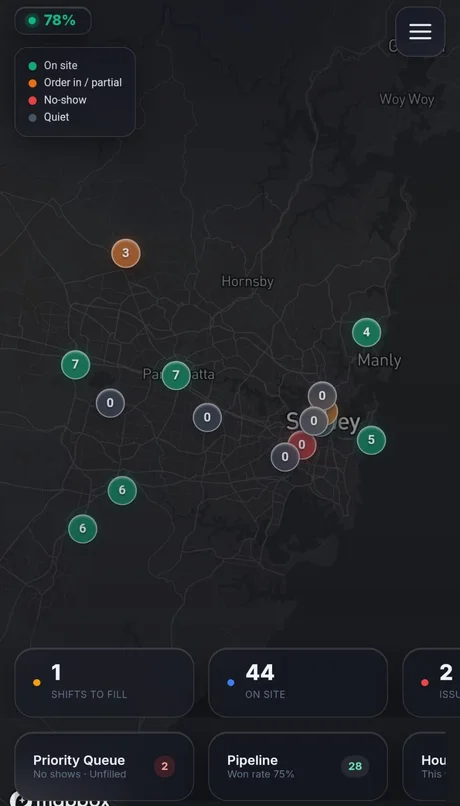
Every site, every crew, every shift — live on one map. See who's on site, who's running late, what still needs filling and what needs you — from your desk or your pocket.
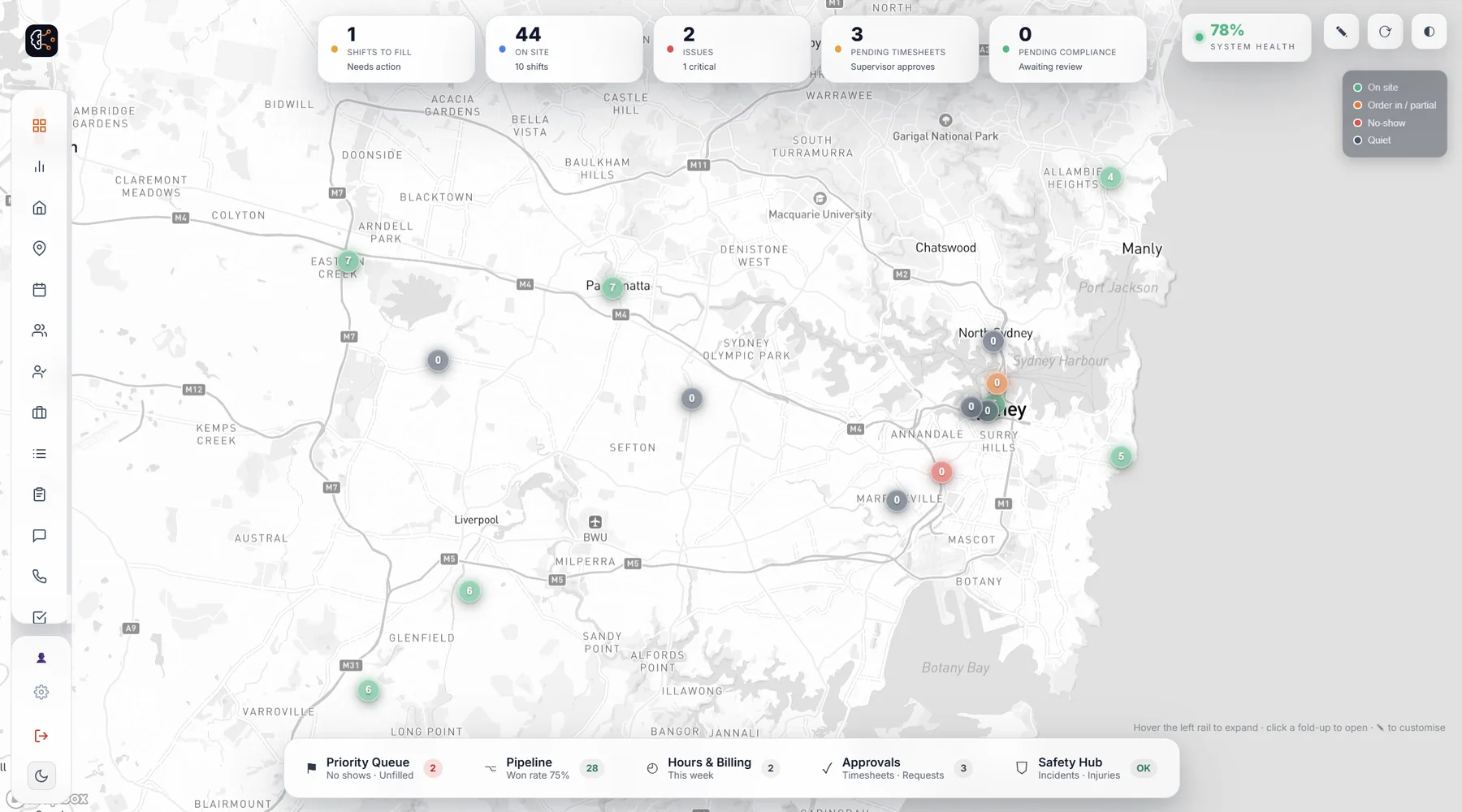
OnCrew Command Centre — a live dispatch map of Sydney showing crews on site, a no-show flagged, shifts to fill and system health
OnCrew Command Centre on a phone — the live dispatch map and key stats in your pocket
Live dispatch mapOn-site & no-showsShifts to fillTimesheets & complianceLive hours & billingLive approvals

The platform

Everything it takes to run a crew, automated

From the first job request to the payroll export — one intelligent system instead of ten disconnected tools.

1 · Onboarding engine

A fully-vetted worker in minutes, from a phone

The problem: onboarding is a paper avalanche — forms, tax, super, bank, tickets, medical — chased over days, and half never finished properly.

OnCrew: a worker onboards themselves on their phone in minutes — details, tickets photographed, your own induction, medical, tax, super and bank — captured once, encrypted where it's sensitive, instantly compliance-ready.

Worker self-onboarding
5 steps · done on a phone
✓ Personal details & emergency contact
✓ Tickets & licences — photographed
✓ Your custom induction completed
✓ Medical — encrypted at rest
✓ Tax, super & bank
Ready to work
2 · Compliance engine

From shoebox to shield

The problem: licences, first-aid, inductions, medicals — all expiring on different dates, tracked badly or not at all. One lapsed ticket on site is a stop-work, a fine, or worse.

OnCrew: every ticket catalogued, every expiry watched, automatic reminders before they lapse, and a hard gate that blocks a non-compliant worker from any job that needs the ticket.

Compliance — live
98%compliant
AHPRA registrationValid
First Aid / CPRValid
ImmunisationExpires 12d
Police checkValid
2 carers blocked from aged-care shifts · reminders auto-sent
3 · Smart Fill

Match and allocate the right workers, in minutes

The problem: a dozen orders for tomorrow, each with its own tickets. The right crew are buried in your database, and digging them out means hours of calls.

OnCrew: Smart Fill reads each role's requirements and instantly surfaces the workers who match — qualified, in-date, available, ranked by who actually turns up — then allocates them to the shift and sends the offers in one tap.

Smart Fill — Carpenter ×3
CS
Connor Silva
Carpenter · WAH ✓ EWP ✓
96%
MR
Mason Reid
Carpenter · WAH ✓ EWP ✓
91%
SN
Sofia Nguyen
Carpenter · WAH ✓ EWP ✓
85%
BB
Blake Bailey
Carpenter · WAH ✓
78%
4 · Geofenced clock-in

Trusted from the gate, to the minute

The problem: paper and honesty-system timesheets are guesswork — you've no way to know who really started when, and Friday turns into an argument.

OnCrew: crews clock on and off inside the site's geofence, so every hour is GPS-verified and stamped in the site's local time — no rounding up, nothing to dispute.

Clock in · Crown Melbourne
Mia Chen · Bartender
✓ Inside venue geofence
✓ 17:58 — local time
✓ Shift: RSA
● Clocked on · 17:58
On shift
5 · Timesheets & payroll

One tap to approve, one click to payroll

The problem: collecting, checking and re-keying timesheets into payroll is slow, error-prone, and the export often breaks your accounting software.

OnCrew: clock-ins become payroll-ready timesheets, supervisors approve in one tap, a missed clock-in is fixed in seconds, and the export drops cleanly into Xero or Employment Hero.

Timesheets — this week
K. Tanaka · 38.0hApproved
S. Nguyen · 41.5hApproved
M. Reid · 36.0hPending
B. Bailey · missed outFix · 1 tap
Payroll-ready export · Xero & Employment Hero
And the rest

Plus everything else you need

Job requests

Supervisors raise a request in seconds — it flows straight into Smart Fill with the site's compliance already attached. Nothing falls through the cracks.

No-show detection

Miss the clock-in window and OnCrew flags it instantly — then chases by SMS and voice automatically, so a gap on site never becomes a surprise.

Live dispatch map

Every shift, every site, every crew on one live map — who's on site, who's late, what needs your attention right now.

Safety & incidents

Structured incident reports from the field — mechanism, PPE, treatment — all timestamped and kept in one place.

Client CRM

Track prospects and clients through your pipeline, log every call, SMS and note, and keep each client's sites, supervisors and shifts in one view.

Powered by Axis

Intelligence that reads your operation, then acts on it

Axis is the intelligence inside OnCrew. It reads your real activity — who's turning up, what each site needs, how your week is tracking — and surfaces the insights and recommendations that let you act before a problem lands.

Reads your operation

Every shift, clock-in, timesheet and no-show is data Axis reads — who is turning up, which sites are short, what is about to lapse — so what it surfaces reflects the week you are actually running.

Surfaces what needs you

Axis watches eight things continuously: no-show risk, shifts about to go unfilled, missing timesheets, clock-ins that never happened, compliance gaps, client escalations, account health and worker reliability.

Consistent, every shift

Axis applies the same checks to every shift, site and worker, and can run in review-only mode so nothing leaves the system without your say-so. The catch never depends on who is on duty.

Built for any crew

One platform, every sector

If you roster people, check tickets and turn hours into pay, OnCrew runs it — whatever the work.

Worker & supervisor apps

Your whole crew, in their pocket

Workers clock in on site and submit timesheets; supervisors request crew and approve hours — all from their phone.

Today's shifts
Kai Tanaka · Carpenter
New offer · Barangaroo Tower
Thu 6:00am–2:30pm · WAH + EWP
AcceptPass
● Clock in on site
Worker app — shifts & offers
Request crew
Demolition Bros · Norwest
Role — Labourer ×6
Start — Tomorrow 7:00am
White CardConfined Space
Send to OnCrew
Supervisor app — request crew

Geofenced clock-in

Crew clock on and off from the job site — hours captured to the minute.

Timesheets that just work

Pending, approved or rejected — a missed clock-in fixed in seconds.

Approve from your pocket

Supervisors request crew and approve hours on the spot.

How it works

Up and running in three steps

From request to payroll, OnCrew handles the whole workflow end to end.

1

Request a shift

Your client or supervisor requests crew in seconds — with the site, skills and compliance they need.

2

OnCrew fills & dispatches

Smart Fill ranks your best-matched, compliant workers and auto-dispatches by SMS and voice until it's covered.

3

Clock in, get paid

Crew clock in on site, supervisors approve, and you export payroll-ready timesheets in a click.

Built to be trusted

Enterprise-grade, by default

Separated by agency

Every worker, client and shift is scoped to your agency, and kept apart from every other business on OnCrew.

Encrypted at rest

Sensitive data — medical, tax, bank — encrypted, with reveal logged.

Full audit trail

Every approval, reveal and change recorded — who, when, what.

Hard compliance gate

A non-compliant worker simply can't be placed on a job that needs the ticket.

Pricing

Simple plans that scale with you

Per-seat pricing — pay only for the workers, supervisors and admins you use, with no worker caps. Every plan includes Smart Fill, compliance and the full crew app.

Essentials
For a small crew getting off spreadsheets. From $5 / worker / month · minimum $99/mo.
See plan →
Starter
For a growing crew across multiple jobs and sites. From $6.50 / worker / month · minimum $199/mo.
See plan →
Enterprise
For large operators needing scale, control & support. Custom pricing, tailored to your operation.
See plan →

See full pricing & features →

Ready to run your crew smarter?

See OnCrew on your own shifts. Book a 20-minute demo and we'll show you the difference.

Book a demo →
Axis
Axis
OnCrew AI · online
Hi, I'm Axis — OnCrew's AI. Ask me anything about filling shifts, compliance, onboarding or how it all works.
Book a 20-min demo →